


Sherwin-Williams Color Expert™
3.8430.00 Reviews
App Specs
- Version
- 2.6.3
- Updated On
- License
- Free
- Downloads
- 500,000+
- Developer
- Sherwin-Williams
- Categories
- House & Home
- Platform
- Android, iOS
Screenshots
 Analysis by AppCompare
When a household is choosing paint, the hardest part is often getting everyone to picture the same result. I like having a visual reference to bring into that conversation, and Sherwin-Williams Color Expert™ gives me a way to explore shades and preview them in a room before anyone commits to a purchase. It is a free House & Home app from Sherwin-Williams, and its tools are most useful when I treat them as a starting point for a real paint decision, not a guarantee of exactly how a finished wall will look.
A shared screen can make color choices easier
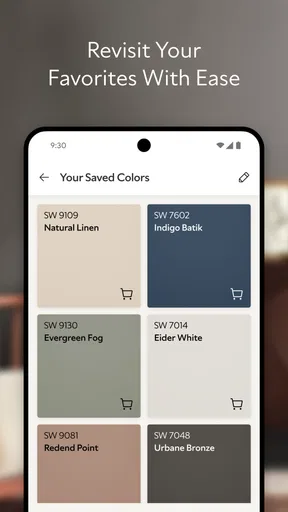
Imagine a weekend project where one person wants a calm neutral for the living room and another is leaning toward something warmer. Instead of relying on names or trying to remember a color seen in a store, I can use a photo of the room as a conversation aid. A saved palette can also give a household a small set of options to discuss, rather than sending everyone off to browse an endless stream of possibilities.
That kind of shared use works best when one person keeps the project organized. I would save a few genuinely different candidates, then look at them together on the same wall or room photo. It is more useful to compare a warm neutral with a cooler one than to save several nearly identical whites. If people are using separate phones, a screenshot or a palette shown in person can help everyone discuss the same choices, though I would not assume the app automatically syncs decisions between household members.
Keep the phone, photo, and decision in the right hands
For a shared device, I would set a simple boundary before handing it around: use the room photo and color tools, but let the person managing the project handle any steps involving shopping or an order. The app is free, but that does not mean paint or samples are free; the choice of a shade and the decision to buy it are separate steps. This distinction is especially helpful when children are curious about the visualizer or when a family member is exploring colors without being responsible for the project budget.
Before taking a room picture, I would move clutter that distracts from the wall and choose a view that shows the area people actually want to paint. That makes comparisons easier to discuss. I would also avoid treating the photo as a precise preview: a phone display, room lighting, surrounding colors, and the actual painted surface can all affect how a shade appears. The visualizer is valuable for narrowing choices, not for replacing a physical sample or an in-person look.
Coordination matters more than collecting options
A practical workflow is to agree on the room and the surfaces first, then use the app to gather a short list. If one person is choosing a wall color while another is considering trim or nearby furnishings, keeping those decisions in separate groups makes the palette easier to understand. I find that a color list is most useful when each option has a reason attached to it: for example, one might suit the room’s existing furniture, while another might feel better in evening light.
For a couple or roommates, the app can support a focused conversation, but it cannot settle differences in taste by itself. I would ask each person to pick one preferred candidate and one acceptable alternative, then compare those choices in the room photo. If the project involves a designer, a saved palette can be a convenient discussion aid; if it involves a contractor, I would still confirm the precise product and color details through the appropriate purchasing process rather than relying on a phone image alone.
Worth Reading Before You Choose

EA SPORTS FC Mobile 26 Is a Bigger Football Game, but It Takes Time

Flipboard Shows What News Apps Must Do Beyond the Feed

Switching to Android Auto Means Rethinking Your Driving Routine

Google Calendar Makes a Crowded Week Easier to Manage

Ludo King Makes the Most of the Minutes Between Plans

Baby Panda World Brings Quick Play to Modern Phones, but Its Game Library Feels Busy
Who will get the most from it?
I think this is a good fit for homeowners, renters planning an approved refresh, and DIY painters who want help turning a vague idea into a small, considered shortlist. It is particularly handy if you have a fabric, photograph, or existing decor item that gives you a starting color, or if you find it difficult to imagine a shade across a large wall. Someone who already knows the exact color they want may not need to spend much time exploring, while a person seeking a full interior-design plan may prefer a broader planning tool or direct advice from a designer.
It is also worth remembering that color matching from a photo is an estimate, not a promise that the paint will look identical to the object in the picture. Camera conditions and the display can influence what you see. I would use the match to find promising paint candidates, then compare them in the room before making a final call. That extra check matters most for delicate undertones, where a shade that looks subtly warm on a screen can feel different beside existing flooring or furniture.
What to expect from a color preview
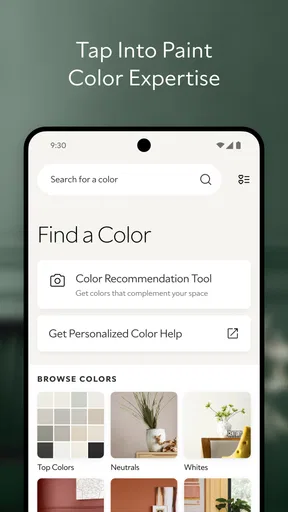
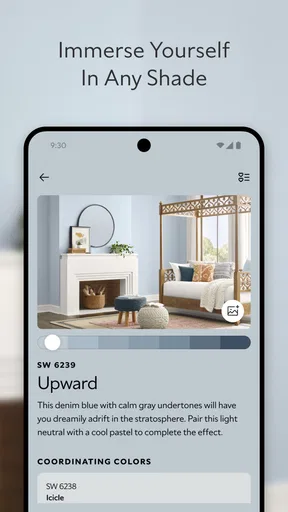
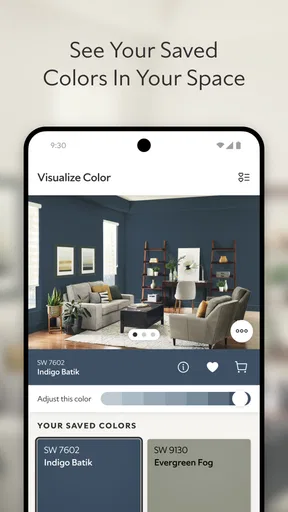
When I open the app, the interface feels straightforward, and I can browse colors by family or name. The ColorSnap Visualizer lets me take a picture of a space and try paint colors on it. I see that as a quick way to reject shades that clearly do not suit a room, rather than a dependable prediction of the finished result. A preview can help answer “Does this general direction work?” It is less reliable for deciding between two close shades or judging how a color will look in every kind of light.
There is a useful trade-off here. Browsing and visualization are faster than buying several samples just to explore broad color directions, but a phone cannot reproduce the way paint behaves on a real wall. I would narrow the field in the app and then inspect a sample in the room at different times of day. That sequence saves effort without asking the visualizer to do more than it can reasonably do.
Discovering Your Perfect Shade
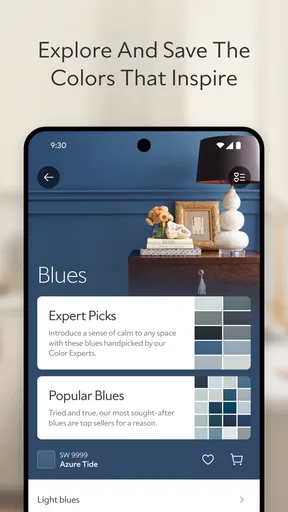
The first thing I noticed when I opened the app was its sleek and user-friendly interface. It’s like having a personal color consultant right in your pocket. You can explore a vast library of colors, from soothing neutrals to bold, vibrant hues. The app even allows you to search by color family or name, making it super easy to find exactly what you're looking for.
One of my favorite features is the ColorSnap Visualizer. Ever had a color in mind but not sure how it would look on your walls? You can take a picture of your space and virtually paint it. It’s seriously satisfying to see your room transform before your eyes — without making any commitments!
Color Matching Like a Pro
Another cool feature is the color matching tool. Let’s say you find a piece of fabric or a photo with a color you adore. Simply snap a picture, and the Sherwin-Williams Color Expert™ app will match it to their paint colors. It’s a lifesaver when you’re trying to coordinate different elements in a room.
And for those who are always on the go, the app lets you create and save color palettes. These palettes are great for planning future projects or sharing with a designer or friends for feedback. It's like having a mini mood board right on your phone.
Making the Most of Your Paint Project
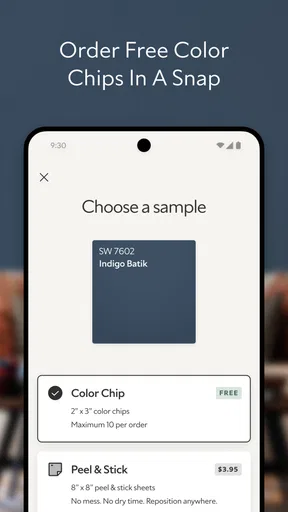
Once you've settled on a color, the app guides you through the purchasing process. You can find the nearest Sherwin-Williams store or order samples directly from the app. The convenience is unbeatable, especially when you're trying to juggle a busy schedule.
If you're a DIY enthusiast like me, you'll appreciate the tips and advice provided on surface preparation and application techniques. It’s like having a painting pro share their secrets with you. Every step is covered, ensuring your project turns out exactly as you envisioned.
For a household project, I would use those practical pointers alongside a clear plan: check the wall’s condition, decide who is handling preparation, and agree on the color before anyone starts painting. The app can help with color exploration and project guidance, but a successful result still depends on the surface and the care taken during application. If your project has unusual surfaces or needs beyond a straightforward room refresh, I would seek advice specific to that job rather than assume general tips cover every case.
Age, trust, and a realistic household role
The app is rated for Everyone, so its subject matter is suitable for a broad audience. That is different from saying every household member should make purchases or manage the project. I would be comfortable letting a child explore colors with an adult nearby, while keeping decisions about ordering samples, choosing products, and spending money with the person responsible for them. I would not expect the age rating to imply family accounts, parental controls, or shared project management; the useful boundary is simply to supervise access according to how your own device and household are set up.
The app has an average rating of 3.9 from around 1,200 ratings, alongside 318 written reviews, and it has been installed over 500,000 times. I take that as a sign that plenty of people have tried it, not as proof that every feature will suit every project. Its current version is 1.27.0-release-1.27.0-6525, it runs on Android 8.0 or later, and it was released on April 11, 2024. Those details are useful if you are checking whether an older Android phone can run it; they do not change the practical need to judge colors in the actual room.
How it compares with familiar alternatives
The usual alternative is to browse paint chips in a store, collect samples, and make comparisons at home. That remains the stronger method for judging a final shade because you can see a physical color in the room, but it can be less convenient when you are only beginning to explore. A general photo editor can tint a wall too, yet a paint-focused app is more relevant when you want to connect a visual idea with paint colors and a shopping step. I would use Color Expert to shortlist and organize, then use real samples or in-person viewing to make the final decision.
There is another useful distinction: a color app is not a complete renovation planner. It can help with choosing and visualizing shades, but the user still has to coordinate the room, surfaces, purchase, and labor. If your main challenge is deciding between paint colors, its focused tools make sense. If you need detailed project scheduling, cost estimates, or room layout planning, I would look for a tool built for those tasks rather than expecting this app to replace them.
Making the Most of Your Paint Project
Once you've settled on a color, the app guides you through the purchasing process. You can find the nearest Sherwin-Williams store or order samples directly from the app. The convenience is unbeatable, especially when you're trying to juggle a busy schedule.
If you're a DIY enthusiast like me, you'll appreciate the tips and advice provided on surface preparation and application techniques. It’s like having a painting pro share their secrets with you. Every step is covered, ensuring your project turns out exactly as you envisioned.
A measured verdict for the household
My best advice is to treat this as a planning companion for choosing Sherwin-Williams colors, not as the final authority on what a wall will look like or what a project will cost. It is free to download, and its focus on color browsing, photo matching, palettes, visualization, and paint-project guidance can make the early decisions feel less abstract. The main friction is that the screen remains a screen: close shades and lighting changes deserve a real-world check before you commit.
For a household that wants to compare ideas, share a shortlist, and keep a paint decision moving, I think the app earns a place on the phone. It is less compelling for someone who wants a broad design suite, automatic coordination among multiple people, or a final color verdict without samples. Used with those limits in mind, Sherwin-Williams Color Expert™ is a practical way to get from “maybe this color” to a more confident next step.
Pros
- Easy to navigate interface for color selection.
- Wide range of color palettes available.
- Integrated room visualizer for realistic previews.
- Personalized color recommendations based on preferences.
- Seamless sharing options for project collaboration.
Cons
- Requires account creation for full feature access.
- Limited offline functionality.
- Occasional lag in the room visualizer.
- Some features locked behind in-app purchases.
- Color accuracy may vary on different screens.
FAQs for Sherwin-Williams Color Expert™
What features does the Sherwin-Williams Color Expert™ app offer?
The Sherwin-Williams Color Expert™ app provides a range of features designed to assist with color selection and project planning. Users can explore a vast library of Sherwin-Williams colors, use the ColorSnap® Match feature to match colors from any photo, and access project planning tools like paint calculators and store locators. The app also offers expert advice and inspiration galleries.
Is the Sherwin-Williams Color Expert™ app free to use?
Yes, the Sherwin-Williams Color Expert™ app is free to download and use. It provides access to a wealth of resources and tools without any upfront costs. However, users should be aware that purchasing paint or other products from Sherwin-Williams will incur costs, which are separate from the app itself.
How accurate is the ColorSnap® Match feature in the app?
The ColorSnap® Match feature in the Sherwin-Williams Color Expert™ app is designed to provide a highly accurate color match by analyzing colors from photos. While it performs well in most lighting conditions, users should remember that screen displays and lighting can affect color perception. It's always a good idea to test a sample before committing to a large purchase.
Can I use the Sherwin-Williams Color Expert™ app offline?
The Sherwin-Williams Color Expert™ app requires an internet connection for certain features, such as accessing the latest color trends, downloading updates, and using the store locator. However, users can still explore saved colors and projects offline, making it a versatile tool for on-the-go planning.
Is the Sherwin-Williams Color Expert™ app available for both Android and iOS?
Yes, the Sherwin-Williams Color Expert™ app is available for both Android and iOS devices. Users can download it from the Google Play Store and the Apple App Store. This cross-platform availability ensures that users can access the app's features regardless of their preferred device.


